How Exa finds the right page in billions, explained simply
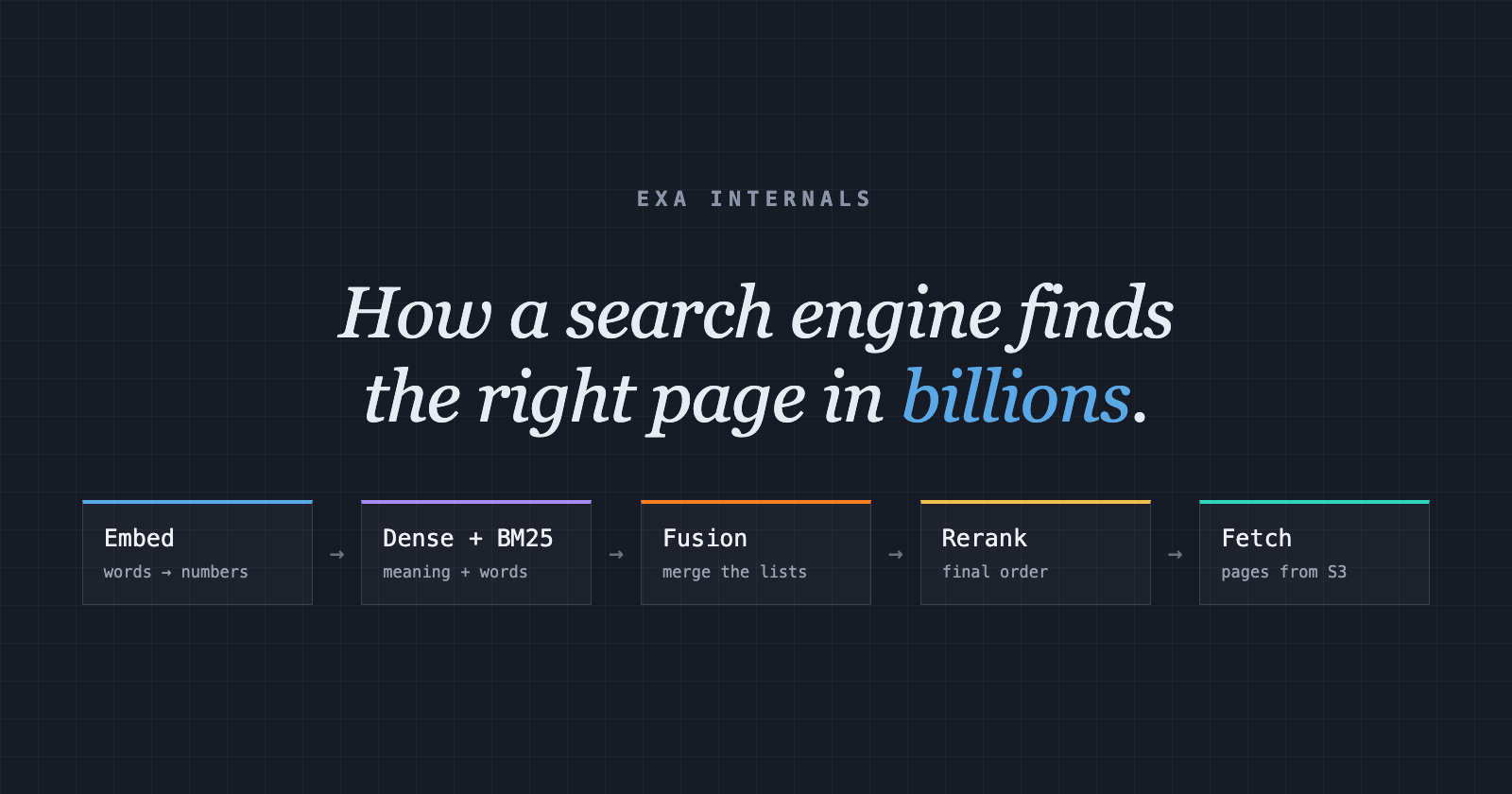
I use Exa as the web search layer in a lot of my agent work. For a long time it was a black box to me: a query goes in, ten good links come out.
So I read through Exa’s engineering posts to work out what actually happens in between. It turns out the whole thing is built from a handful of ideas that are surprisingly simple once you strip the jargon out.
By the end of this post you’ll know:
- The difference between an index and a database
- Why search engines look for words and meaning
- How Exa avoids checking billions of pages on every search
- What a “1-bit vector” is and why it’s such a good trick
- How two lists of results become one final answer
One caveat before we start: these posts span late 2024 to 2026, and Exa ships fast. Treat the specifics as a snapshot of how it works, not a spec.
1. An index is not a database
Think of a book.
- The pages are the database. They hold the actual content.
- The index at the back is the index. It doesn’t hold the content. It tells you where to look: “embeddings, p. 42, p. 118”.
Search works exactly the same way:
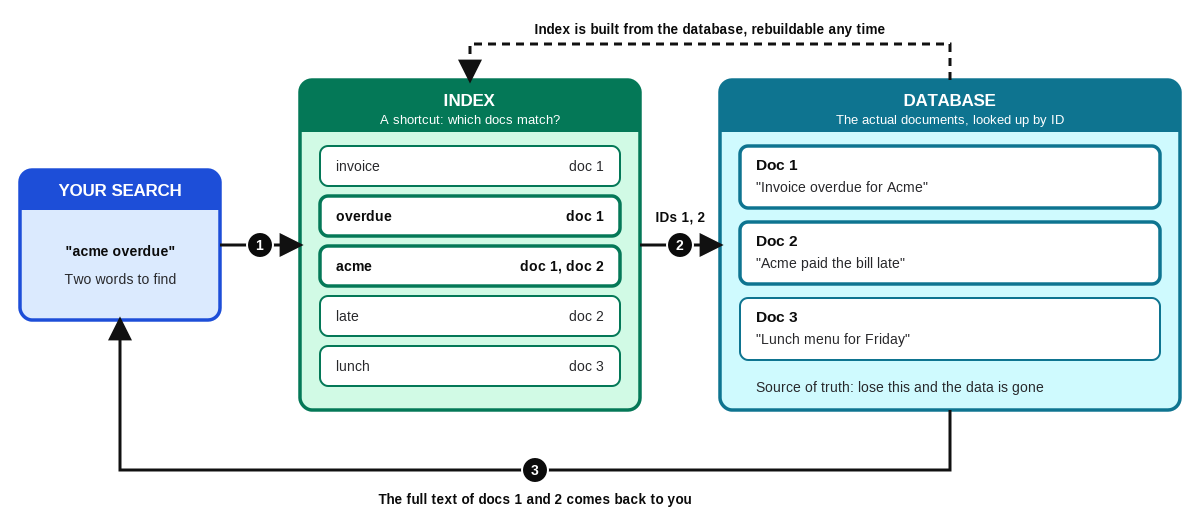
- Your search goes to the index, which answers “which documents match?”
- The index hands back a list of IDs, not documents
- Those IDs go to the database, which returns the full text
Why keep them separate?
- Without an index, every search has to read every document. Fine for three documents, impossible for billions.
- Without the database, the index only gives you IDs. There’s nothing to show anyone.
- An index is built from the database, so you can always throw it away and rebuild it. Lose the database and the data is gone.
At Exa:
- The database is a set of Lance columnar files on S3, with one row per web page: its text, its metadata and its embeddings.
- A pipeline called exa-d keeps it fresh. When a page changes, it only recomputes the columns that depend on that change.
- The crawlers track over 500 billion URLs.
- On top sit three kinds of index: one for words, one for meaning and one for filters like date or domain.
2. Two ways to search: words and meaning
There are two fundamentally different ways to find a page for a search.
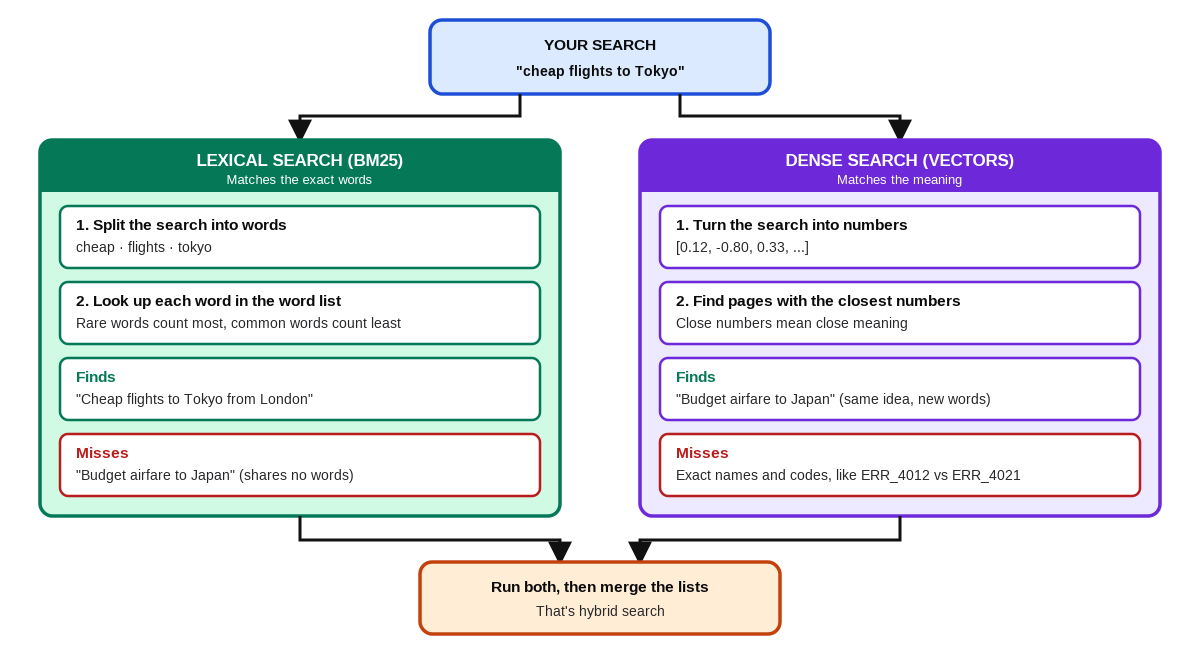
Lexical search: match the words
“Lexical” just means “about words”. The standard method is called BM25, and its rules are intuitive:
- Rare words count more. A page matching “Tokyo” says more than a page matching “to”.
- More mentions help, with diminishing returns.
- Shorter pages get a small boost, so a page doesn’t win just by being long.
It’s backed by the word list from section 1: each word points to the pages that contain it.
Dense search: match the meaning
A model reads each page and turns it into an embedding: a list of numbers that describes what the page is about. Pages with similar meanings get similar numbers.
At search time, your query gets turned into numbers the same way, and the engine finds the pages whose numbers are closest.
It’s called “dense” because every number in the list has a value. A word list is the opposite: out of every possible word, a page only uses a few, so most of its slots are empty. That’s “sparse”.
Why run both
| Lexical (BM25) | Dense (vectors) | |
|---|---|---|
| Matches on | Exact words | Meaning |
| Great at | Names, IDs, error codes, rare terms | Synonyms, paraphrases, natural questions |
| Weak at | Same idea in different words | Telling ERR_4012 from ERR_4021 |
Each one catches what the other misses. Running both and merging the results is called hybrid search, and it’s what Exa does. In Exa’s own words, the most powerful search architecture “combines both keyword and embedding methods”.
Exa’s word index at web scale
Exa’s BM25 index lives in memory, and at first it cost over 1.8 TB per billion documents. A few tricks got it down:
- Start from the rarest words. Their page lists are short, so they make a small, promising starting set.
- Give up early. Pages that mathematically can’t reach the top results get dropped before they’re fully scored.
- Compress everything. Packing the page lists tightly halved the memory, and queries got about 10% faster as a bonus.
3. The meaning index: sort the library into rooms
Here’s the problem with dense search. To find the closest pages, you’d compare your query to every page’s numbers. With billions of pages, that’s far too slow.
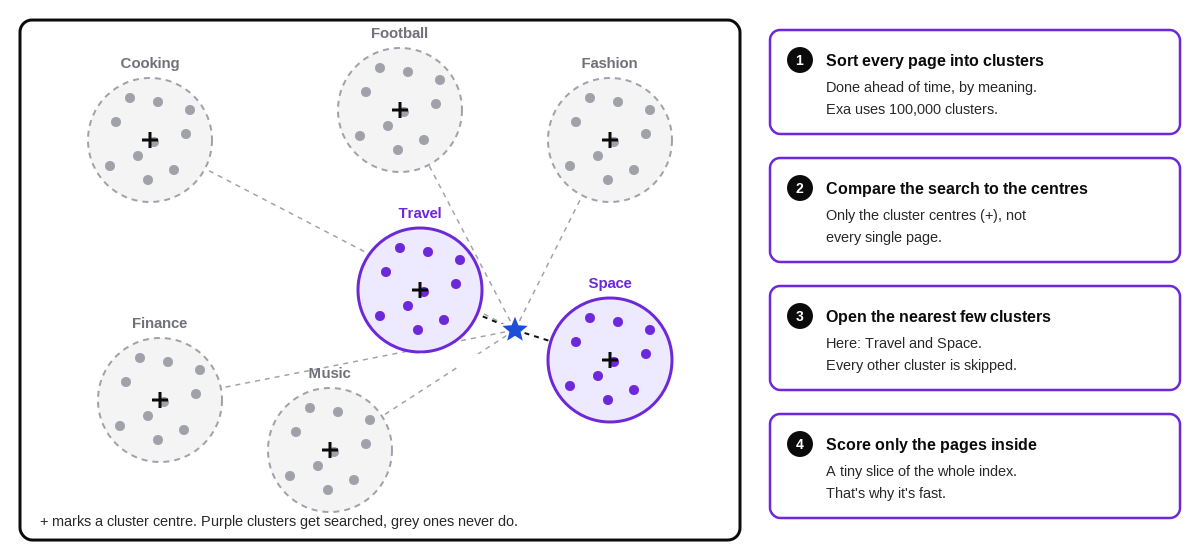
The fix is to sort the pages into groups ahead of time, then only search the right groups.
How it works:
- Before any search: group every page with pages of similar meaning. Each group gets a centre point.
- At search time: compare your query to the centre points only, not to every page.
- Open the nearest few groups.
- Score only the pages inside them. Everything else is skipped.
This technique is called IVF, short for inverted file index. “Inverted” is the same idea as the word list: instead of page → contents, it stores group → pages.
At Exa:
- There are 100,000 clusters.
- Clustering gave roughly 1000x more throughput without much accuracy loss, according to Exa.
The catch: a relevant page can sit right on the edge of a group and land in the neighbouring one. That’s why you open a few nearby groups, not just the single closest.
4. 1-bit vectors: the blurry thumbnail trick
Clustering cuts down how many pages you check. The next problem is memory.
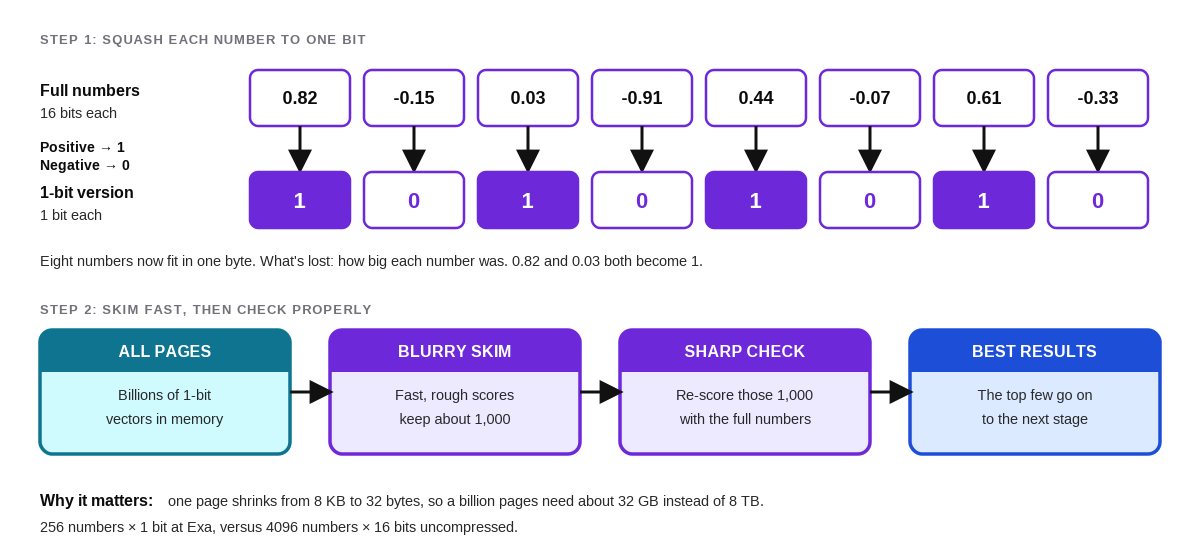
- A full embedding at Exa is 4096 numbers, each taking 16 bits.
- That’s 8 KB per page, or about 8 TB for a billion pages, all of it needing to sit in fast memory.
Exa squeezes this twice.
Squeeze one: keep only the first 256 numbers. Exa trains its embedding model with a technique called Matryoshka, named after the Russian nesting dolls. It forces the start of the list to work as a smaller version of the whole list. Keeping the first 256 of 4096 numbers cuts memory by 20x.
Squeeze two: keep only the sign of each number. This is called binary quantization, and it’s the clever bit.
Why keeping just the sign works
To compare two embeddings, you multiply the numbers in matching positions and add them all up.
- When both numbers have the same sign, the product is positive and pushes the score up.
- When they have opposite signs, the product is negative and pulls it down.
So most of the meaning lives in which way each number leans, not exactly how far. Keeping only the sign throws away detail but keeps the direction. Each number shrinks from 16 bits to 1 bit, another 16x saving.
It’s like keeping a blurry thumbnail of every photo instead of the full-resolution file. You can still easily tell a beach from a snowy mountain.
Where it goes wrong
The thumbnail forgets how big each number was. A number like -0.01, which is basically zero, becomes a full “negative”. A vague page with lots of tiny numbers can look like a perfect match.
Here’s a small worked example, scoring two pages against the same query:
| Page | Real score | 1-bit score |
|---|---|---|
| Almost identical to the query | 1.07 (best) | 2 |
| Vague, with tiny numbers | 0.14 | 4 (best) |
The 1-bit version picks the wrong winner.
The fix: skim, then look properly
- Use the 1-bit vectors to grab a generous shortlist, say the top 1,000. It’s fine if the order is a bit off.
- Re-score just that shortlist using the full, uncompressed numbers.
- Keep the best.
The near-identical page is easily in the top 1,000, so step 2 puts it back on top. The blurry version is only ever used to make the shortlist, never to pick the final answer.
Exa’s extra twist
Most systems compare 1-bit against 1-bit. Exa found that too lossy, so it only squashes the pages and keeps your query at full precision.
- Only one side is blurry, so scores are more accurate.
- It costs almost nothing, since there’s one query but billions of pages.
The maths underneath is also heavily optimised. Every page number is either +1 or -1, so Exa precomputes all the possible results in small lookup tables that sit directly in the CPU’s registers.
The result, by Exa’s own numbers: billions of vectors searched in under 100 ms, using less memory than a gaming PC.
Why not HNSW?
If you’ve used pgvector or most vector databases, you’ve probably met HNSW. It links every vector into one big web of nearest neighbours. Exa chose clusters instead because:
- Filters fit cleanly. Exa looks up which pages pass a filter (like “only 2024”) and only searches those. That’s awkward with one big web.
- It splits across machines. Clusters shard naturally, while one global web is hard to divide.
- It’s cheaper. Exa says it came out about 10x cheaper than quotes from cloud vector database services.
For most apps with a few million vectors, HNSW is still the sensible default. Exa’s choice makes sense at web scale.
5. Fusion and reranking: two lists become one answer
After both searches run, you have two separate ranked lists: one from BM25 and one from vectors. Two more steps turn them into a final answer.
Fusion: merge the lists
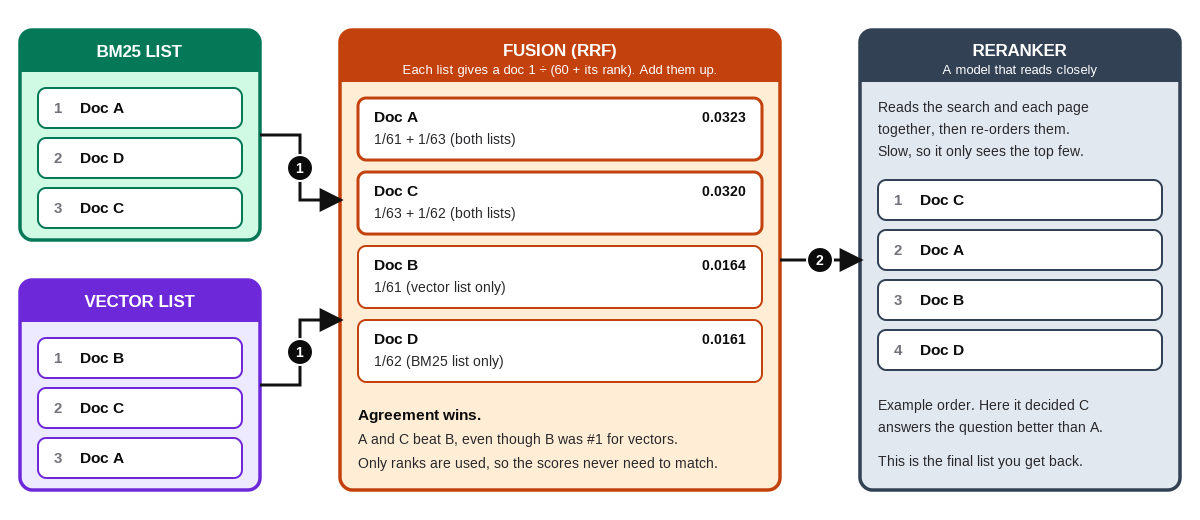
You can’t just compare the scores. BM25 might give a page 14.2 while vector search gives 0.83. They’re on completely different scales.
The popular fix is Reciprocal Rank Fusion (RRF), which ignores scores and uses only positions:
- In each list, give every page
1 / (60 + its rank) - Add up a page’s points across both lists
- Sort by the total
In the example above, Doc B is the number one vector result, yet it finishes third. Docs A and C appear in both lists, so they beat it.
That’s the whole idea of RRF: agreement wins.
The 60 comes from the original RRF paper. A bigger number flattens the gap between rank 1 and rank 10, and a smaller one rewards each list’s top hits more.
Reranking: look closely at the finalists
Fusion is quick but crude. A reranker is a model that reads your query and each candidate page together and judges how well the page actually answers it.
- It’s much more accurate than either search on its own.
- It’s also much slower, so it only ever sees the top few candidates.
Exa has built its own reranker for this final step.
What Exa hasn’t published: whether it merges its two lists with RRF, blends the scores some other way, or leaves the whole job to the reranker. All we know is that both kinds of search feed into ranking.
6. Putting it all together
Here’s the whole journey of one Exa search:
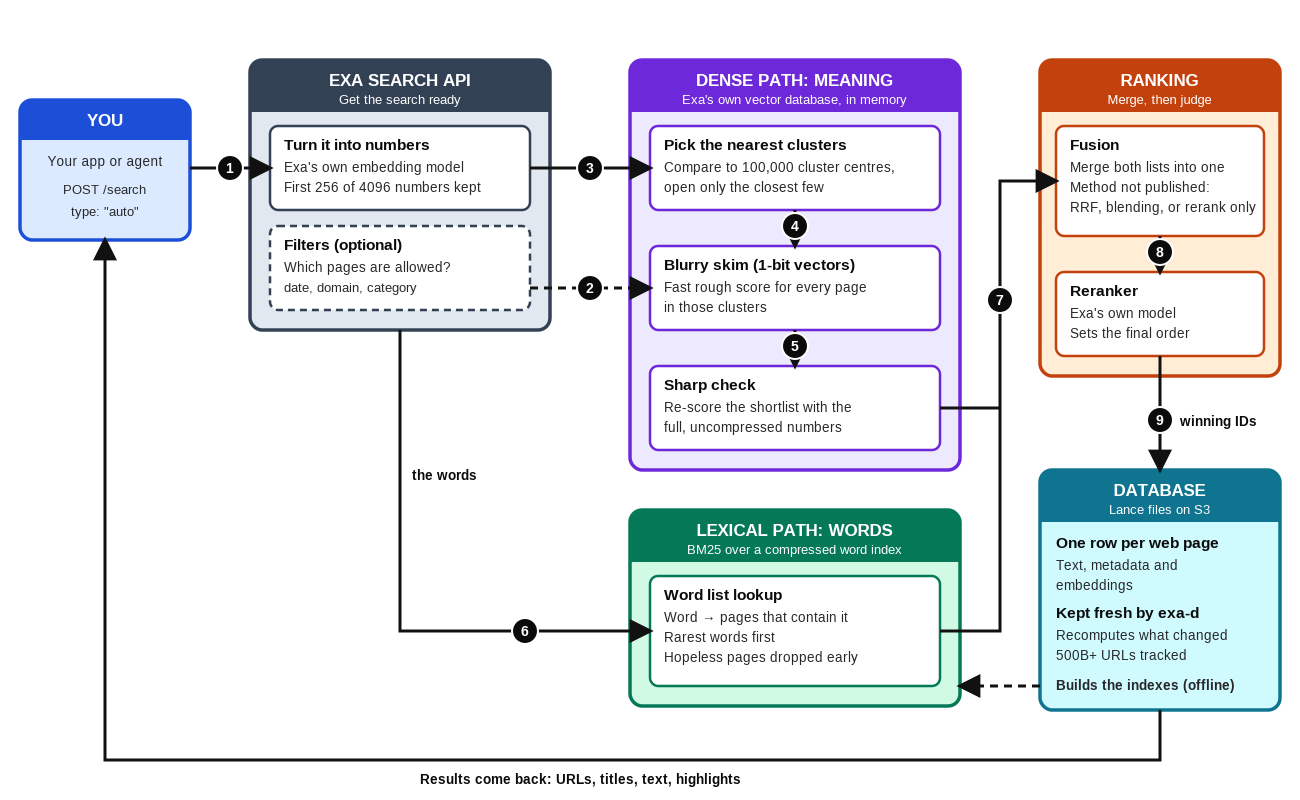
- Turn your search into numbers with Exa’s embedding model
- Apply any filters, like date or domain, to get the list of allowed pages
- Pick the nearest clusters out of 100,000
- Blurry skim: score the 1-bit vectors inside those clusters
- Sharp check: re-score the shortlist with the full numbers
- Word search: BM25 finds pages containing your words, at the same time
- Fusion: merge the meaning results and the word results
- Rerank: a model sets the final order
- Fetch the pages for the winners from the database and send them back
Each step shrinks the pile, so the slow, careful work only ever happens on a handful of pages.
What I’d take from this
- Shortlist cheaply, judge expensively. Every stage of Exa follows this pattern, and it works just as well in your own systems.
- For your own data, you don’t need Exa’s machinery. Postgres full-text search, pgvector and RRF will get you a long way.
- You can combine Exa with your own search. Treat Exa’s results as one more ranked list and fuse it with your own BM25 and vector results using RRF. It helps most when the same URLs show up in more than one list.
- You can’t tune Exa’s balance. The API gives you search types (
auto,lite,deep-lite,deep), not separate word and meaning lists. If you need control over that balance, that’s the argument for running your own index.
The thing that surprised me most is how little magic there is. Each piece is a simple idea: an index, two ways of matching, rooms, blurry thumbnails, a merge and a judge. The hard part is making each one fast and cheap enough to work across billions of pages.
Sources
- How we built a web-scale vector database, Exa, December 2024
- Serving BM25 with 50% memory reduction, Exa, May 2025
- How we’re building the next generation of search, Exa, March 2025
- exa-d: Data Framework to Process the Web, Exa, January 2026
- Relevance isn’t enough: what it takes to rerank the web, Exa, October 2026
- Exa Search API docs