How Parallel turns a research brief into a cited answer, explained simply
So far in this series I’ve taken apart how Exa finds the right page and how Keenable turns a thousand pages into a table. Exa gives you ten good links. Keenable gives you a table.
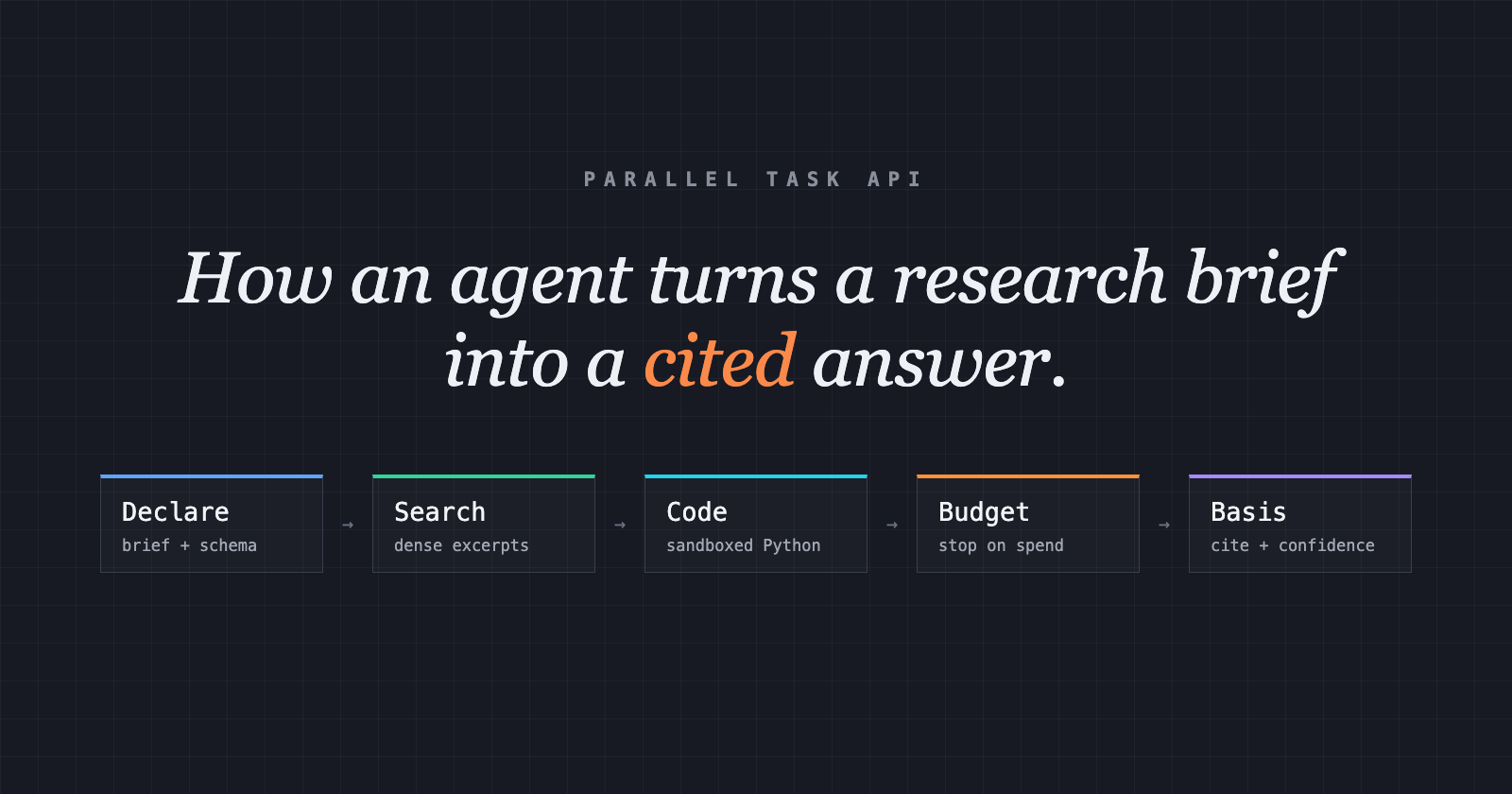
Parallel gives you something else again: an answer to a research brief, filled into a schema you define, with sources, reasoning and a confidence rating for every field.
So I read through Parallel’s engineering posts, docs and benchmark write-ups to work out what happens between the brief going in and the answer coming out. Once again, it’s a handful of simple ideas stacked on top of each other.
By the end of this post you’ll know:
- Why search for a model looks different from search for a person
- What it means to declare a research task instead of scripting it
- How Parallel’s research agent keeps its memory from filling up
- How a fixed price buys a variable amount of research
- What “calibrated confidence” means and how to use it
One caveat before we start: these posts span April 2025 to October 2026, and Parallel publishes far more about its research agent than about its index. Most of the benchmark numbers below are Parallel’s own. Treat the specifics as a snapshot of how it works, not a spec, and I’ll flag what isn’t published as we go.
1. Three jobs called “search”
When an agent “searches the web”, it’s usually doing one of three different jobs. Parallel sells each one as its own API, and each one is built on the one below it.
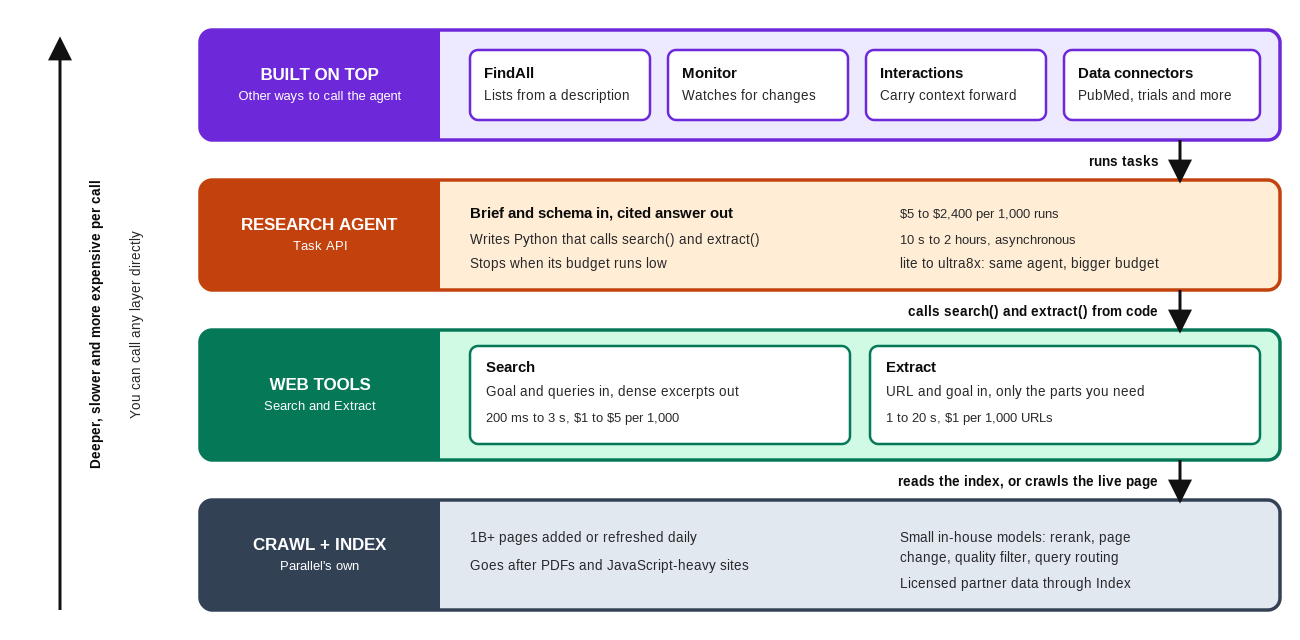
| Job | Parallel API | You send | You get back | Speed |
|---|---|---|---|---|
| Find | Search | A goal and a few queries | Pages with the relevant bits | 200 ms to 3 s |
| Read | Extract | A URL and a goal | Just the parts of the page you need | 1 to 20 s |
| Research | Task | A brief and an output shape | A filled-in answer, with evidence | 10 s to 2 hours |
The important bit is the layering. Parallel’s research agent doesn’t use someone else’s search engine. It calls Parallel’s own Search and Extract APIs, which run on Parallel’s own index. Parallel says every improvement to Search shows up straight away in its own research product, and every weakness does too.
So to understand the research agent, start at the bottom.
2. Search for a reader that isn’t a person
A normal search engine is built for a person who will click.
- It ranks links, because the person picks one and reads it
- It shows short teaser snippets, because the person only needs enough to decide
- It optimises for clicks, because that’s what the person does next
A model doesn’t click. Everything it learns about a page has to fit in its context window: the text it can hold in mind at once. Parallel frames the problem as a different question entirely: “what tokens should go in an agent’s context window to help it complete the task?”
What changes when the reader is a model
- You describe the goal, not just the keywords. A search takes an
objectivein plain English alongside a few shortsearch_queries. Parallel says adding the objective improves results by 10 to 20%. - Results come back as dense excerpts. Each result carries the passages of the page that matter for your objective, not a two-line teaser. Often the agent never needs to open the page.
- Ranking is about usefulness, not clicks. Parallel says it scores pages on how relevant their text is, page and domain authority, how efficiently they use the context window, and whether other sources agree.
- One call should do the work of several. Every extra search adds latency and fills the context window further. The aim is to resolve more of the question in a single call.
Here’s a real request from Parallel’s docs:
curl https://api.parallel.ai/v1/search \
  -H "Content-Type: application/json" \
  -H "x-api-key: $PARALLEL_API_KEY" \
  -d '{
    "objective": "Find latest information about Parallel Web Systems. Focus on new product releases, benchmarks, or company announcements.",
    "search_queries": [
      "Parallel Web Systems products",
      "Parallel Web Systems announcements"
    ]
  }'
You get back 10 results, each with a URL, a title, a publish date when one is known, and a list of excerpts.
Four speeds
Search comes in four modes, and you pick per call:
| Mode | Latency | Price per 1,000 | Good for |
|---|---|---|---|
turbo | ~200 ms | $1 | Voice and chat, where a person is waiting |
fast | ~700 ms | $1 | Most agents. Parallel’s recommended default |
basic | ~1 s | $5 | Longer excerpts per result |
advanced | ~3 s | $5 | Background research where quality beats speed |
In an independent test by Artificial Analysis (August 2026 data), advanced scored 75 on its Search Index, fast scored 73, and Exa’s auto mode scored 74. The same model with no search at all scored 33.
Extract: read only the part you need
Sometimes the agent does need the page. If that page is a 200-page SEC filing, pasting it all into the context is wasteful.
So Extract also takes an objective. Give it a URL and “what was revenue in 2024?”, and it returns only the passages that answer that, or the whole page as Markdown if you ask for it. It handles pages that only render with JavaScript and long PDFs with images.
Where the pages come from
At Parallel:
- It runs its own crawler and index. As of November 2025, Parallel said over 1 billion pages were added or refreshed every day.
- The crawler goes after hard pages on purpose: long PDFs, JavaScript-heavy sites and images. Parallel’s reasoning is that this is exactly the content least likely to be in a model’s training data already.
- Recrawls are prioritised so fast-changing pages stay fresh without hammering websites.
- The index covers 30+ countries, and queries can be in any language (
turbois English and Japanese only). - Parallel trains its own small models for the index’s everyday decisions: reranking results, deciding whether a recrawled page changed enough to re-index, filtering low-quality pages and routing each query to the right index. Its fine-tuned reranker beat every general-purpose decision model it tested.
- Some content is licensed. Through a program called Index, publishers like The Atlantic and Fortune are paid based on an estimate of each source’s Shapley value: how much it actually contributed to the answer an agent produced. Licensed partner data is included in eligible research runs by default.
What Parallel hasn’t published: how big the index is in total, whether retrieval is keyword-based, vector-based or both, or how the excerpts are chosen and compressed. Compared with Exa, the index is mostly a black box.
3. Declare what you want, not how to get it
Now the research layer. With most agent frameworks, you script the research: search for this, open that, summarise, repeat.
The Task API flips that around. You declare what you want, and Parallel works out how to get it. A task has three parts:
- An input: the thing to research, like a company name or a question
- An output schema: the shape of the answer, field by field
- A processor: how much research effort to spend (more on this in section 5)
Here’s what that looks like in Python:
task_run = client.task_run.create(
    input="Parallel Web Systems (parallel.ai)",
    task_spec={
        "output_schema": "The founding date, founders, and most recent product launch of the company"
    },
    processor="core",
)

result = client.task_run.result(task_run.run_id, api_timeout=3600)
Why the schema matters so much:
- It’s a contract. The same schema run over 10,000 companies gives you 10,000 rows with the same columns. That’s what makes it usable for things like CRM enrichment.
- It gives every fact an address. Each field is a separate claim. As you’ll see in section 6, that’s what lets Parallel attach evidence to each one.
- It can be a full JSON Schema, a plain-English description, or
auto, where Parallel picks the shape itself and writes a full research report. Auto only works on the bigger processors.
Tasks are asynchronous. You create a run, it moves through queued, running and completed, and you collect the result when it’s done, or get a webhook. That’s deliberate: a deep research run can take far longer than any HTTP request should stay open.
4. The research agent writes code instead of calling tools
This is the part of Parallel I found most interesting, and it’s the part they’ve written about in the most detail.
The problem: the agent’s memory fills up
Most research agents run a simple loop:
- The model calls a tool, like
search(...) - The tool’s full output gets added to the conversation
- The model reads the whole conversation and decides what to do next
- Repeat
Here’s the trouble. Everything from step 2 stays in the conversation. Every search result and every page the agent reads piles up, and the model has to re-read all of it on every step.
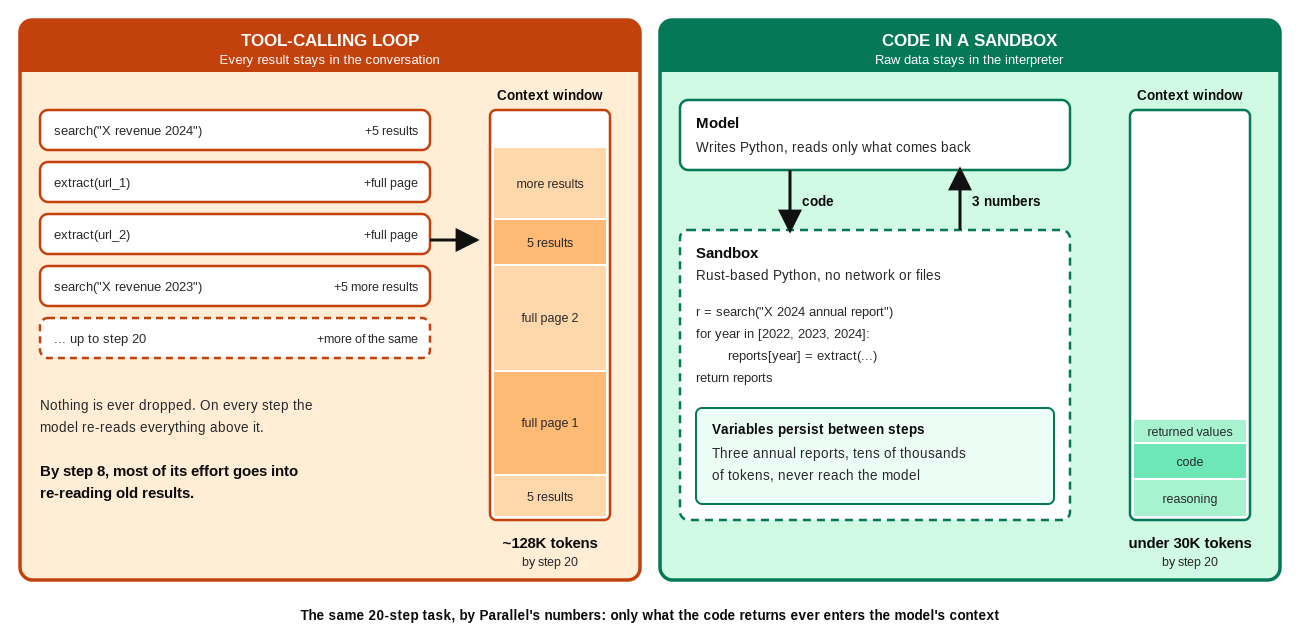
Parallel’s example: a 20-step research task that would fill a 128K-token context window under tool calling. By step 8, the model is spending most of its effort re-reading old results.
The fix: tools become functions in a sandbox
Instead of calling tools one at a time, Parallel’s orchestrating model writes Python. Search and Extract show up as ordinary functions inside that code.
Say the task needs a company’s revenue for three years:
results_2024 = search("Company X 2024 annual report")
report_2024 = results_2024[0].url

url_template = "https://investors.companyx.com/financials/annual-reports/{year}-annual-report.pdf"

reports = {}
for year in [2022, 2023, 2024]:
    url = url_template.format(year=year)
    reports[year] = parse_fn(extract(
        question=f"What was Company X's reported revenue in {year}? Return the value and supporting quote.",
        urls=[url],
    ))

return reports- One search finds the 2024 report and reveals how the URLs are structured
- The model guesses the pattern for the other years
- A loop extracts all three, and pulls out just the revenue figure from each
- Only the three numbers go back to the model. Tens of thousands of tokens of annual report never enter its context.
That same 20-step task now stays under 30K tokens.
Variables are the agent’s notebook
The code runs in an interpreter that keeps its variables between steps. If the model stores findings["report"] in step 3, it’s still there in step 7 when it needs to cross-check revenue against headcount.
That splits the agent’s memory in two:
- The conversation holds the model’s high-level reasoning: what it’s tried and what it’s planning
- The interpreter holds the raw data it has gathered
When the conversation gets long, Parallel compacts it: a summarisation pass condenses older turns. Because the raw data lives in the interpreter, compaction doesn’t throw any of it away.
The sandbox
Running model-written code in production is risky, so the interpreter is locked down hard:
- It’s a sandboxed Python runtime built on Rust
- It has no access to the network, the filesystem or the operating system
- The only way out is through the functions Parallel injects:
search,extractand a few helpers for managing state
So the model can filter, count, loop and branch as much as it likes, and none of it can touch anything outside the sandbox.
Why not the usual designs
Parallel compared this against the common alternatives:
| Design | Problem |
|---|---|
| Plain tool-calling loop | Context grows on every step |
| Loop plus context compression | Important details get summarised away |
| Fixed plan plus sub-agents | Can’t change course once the plan is set |
| Loop plus sub-agents | Coordination is hard, and memory ends up split across agents |
Writing code keeps the flexibility of the loop while keeping the raw evidence out of the prompt but still within reach.
If this sounds familiar, it’s the same idea Anthropic calls programmatic tool calling, and the same reason Keenable has agents write SQL: let the model describe the work in code, and let the data stay where the code runs.
5. A budget, not a step limit
Parallel charges a fixed price per task, not per token. That’s great for you, because costs are predictable. But it means Parallel has to make sure each task stays within what you’ve paid for.
The obvious way is to cap the number of steps. Parallel didn’t do that, because a step limit treats every question the same. An easy lookup and a hard investigation get the same ceiling.
What it does instead:
- Track the actual spend across every model call in the run, including any sub-models
- Warn the model when the remaining budget drops below a threshold
- When the budget is nearly gone, stop and write up the best answer from what it has found so far
A simple factual question might finish in 2 steps and cost a few cents. A complex comparison might run 15 steps. The work adapts to the question, inside a fixed envelope.
Processors are just budgets
This is what the processor names mean. Same agent, bigger budget.
| Processor | Price per 1,000 runs | Typical time (p50) | Roughly how many fields |
|---|---|---|---|
lite | $5 | 45 s | ~2 |
base | $10 | 50 s | ~5 |
core | $25 | 1.5 min | ~10 |
core2x | $50 | 3.5 min | ~10 |
pro | $100 | 3.5 min | ~20 |
ultra | $300 | 4 min | ~20 |
ultra2x | $600 | 6 min | ~25 |
ultra4x | $1,200 | 8 min | ~25 |
ultra8x | $2,400 | 6.5 min | ~25 |
A few things stand out:
- The price is per run, not per field. Asking for 1 field or 20 costs the same.
- Failed runs aren’t charged.
- Every processor has a
-fastvariant. These read mostly from Parallel’s index instead of crawling pages live, which makes them 3 to 5x faster. The standard processors wait for live crawls to get the freshest data. - Aggressive prompt caching keeps the cost of repeated prompts down, which is part of how a fixed price stays affordable.
More budget, more accuracy, until it flattens
Because the budget is the only thing that changes, Parallel can turn it up and watch what happens. Here’s its run on DeepSearchQA, a 900-question Google benchmark where every question is a chain of lookups that depend on each other:
| Processor | Price per 1,000 | Accuracy |
|---|---|---|
ultra | $300 | 70% |
ultra2x | $600 | 77% |
ultra4x | $1,200 | 81% |
ultra8x | $2,400 | 82% |
For comparison, Parallel measured GPT-5.4 with code execution at 63% for $701 per 1,000.
Look at the gaps. The first doubling buys 7 points. The second buys 4. The third buys 1. Budget helps, but each doubling buys less than the last. That’s a useful thing to know before you pick ultra8x by default.
6. Basis: every field shows its working
A research answer you can’t check isn’t much use in production. So every Task API result comes with a basis: a separate entry for each output field explaining where it came from.
Each entry has four parts:
- Citations: the URLs the answer came from
- Excerpts: the exact sentences on those pages that support it
- Reasoning: how the agent got from the sources to the answer
- Confidence:
high,mediumorlow
Here’s a real low-confidence example from Parallel’s docs:
{
  "field": "crm_system",
  "citations": [
    {
      "url": "https://www.linkedin.com/jobs/view/sales-representative-microsoft-dynamics-365-at-contoso-inc-3584271",
      "excerpts": [
        "Looking for sales professionals with experience in Microsoft Dynamics 365 CRM to join our growing team."
      ]
    }
  ],
  "reasoning": "There is limited direct evidence about which CRM system the company uses internally. The job posting suggests they work with Microsoft Dynamics 365, but it's not explicitly stated whether this is their primary internal CRM or simply a product they sell/support. No official company documentation confirming their internal CRM system was found.",
  "confidence": "low"
}
That’s the agent saying, in effect: “here’s my best guess, here’s the one job ad it’s based on, and you probably shouldn’t trust it.” That’s far more useful than a confident wrong answer.
Lists get evidence per item too. If you ask for a list of executives, you get one basis entry for the whole list, plus one for each person: key_executives.0, key_executives.1 and so on. So if one name is shaky, you check that name, not the whole list.
Parallel describes Basis as a proprietary, fine-tuned model, separate from the research itself.
What “calibrated” means
A confidence label is only useful if it means something. If “high” answers are wrong as often as “low” ones, the label is decoration.
Calibrated means the labels line up with reality: high-confidence answers really are right more often than low-confidence ones. Parallel tested this on easy, medium and hard sets of real-world-style questions.
Here’s what that looks like on the hard set, using Parallel’s published numbers:
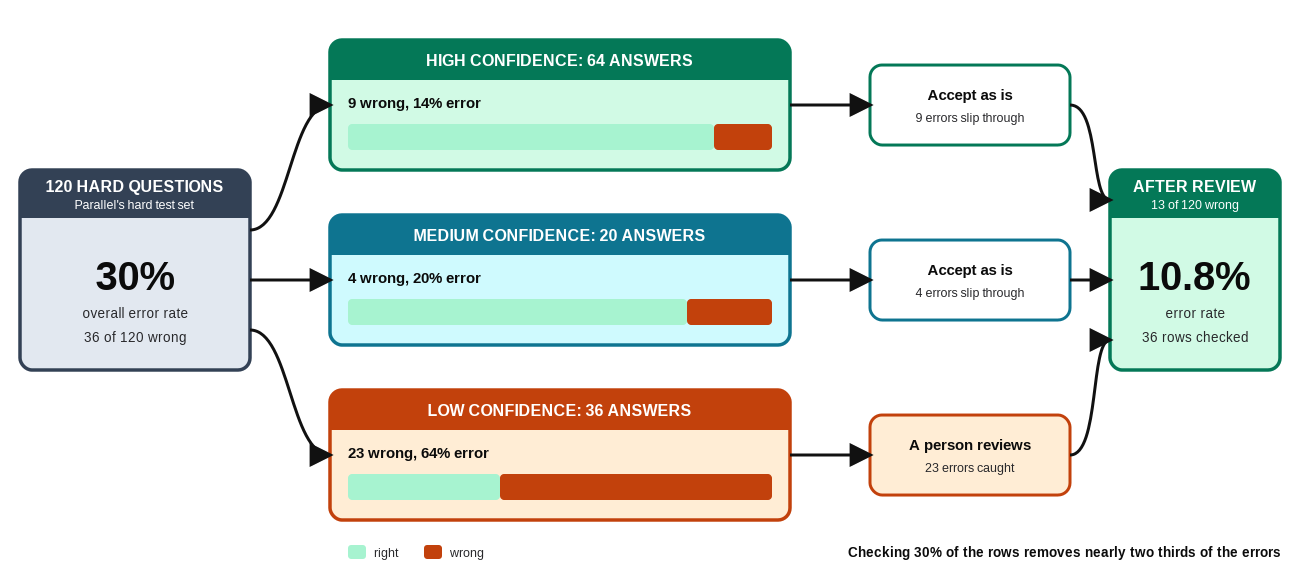
| Confidence | Answers | Wrong | Error rate |
|---|---|---|---|
| High | 64 | 9 | 14% |
| Medium | 20 | 4 | 20% |
| Low | 36 | 23 | 64% |
| All | 120 | 36 | 30% |
Two things fall out of that table:
- High-confidence answers are much safer to skip. Across all three sets, Parallel found they had 2 to 3x lower error rates than the set as a whole.
- Low-confidence answers are where the mistakes are. Here, nearly two thirds of the errors sit in under a third of the rows. Have a person check just those 36 rows and fix them, and the error rate drops from 30% to 10.8%.
This is how Parallel says its customers use it. One outsourcing firm processing insurance claims lets high-confidence results flow straight through and sends the rest to a person.
What Parallel hasn’t published: how the Basis model produces its confidence, or which model runs the research itself.
7. Built on top of the research agent
Once you have a research agent that returns structured, evidenced answers, a lot of other products are just different ways of calling it:
- FindAll builds a list from a description like “dental practices in Ohio with 4+ star Google reviews”. It generates candidates from the index, checks each against your conditions, then runs the Task API on the matches to fill in extra fields. Base pricing is $0.25 per run plus $0.03 per match.
- Monitor re-runs a query on a schedule and tells you when the answer changes.
- Interactions let a task pick up where the last one left off. Every run returns an
interaction_id, and passing it to the next run carries over the full context. You can even switch processors between turns: deep research onultra8x, then quick follow-ups on something cheaper. - Data connectors add sources beyond the open web, like PubMed and ClinicalTrials.gov, which the agent calls only when it decides they’re relevant, and cites like any other source.
8. Putting it all together
Here’s the whole journey of one research task:
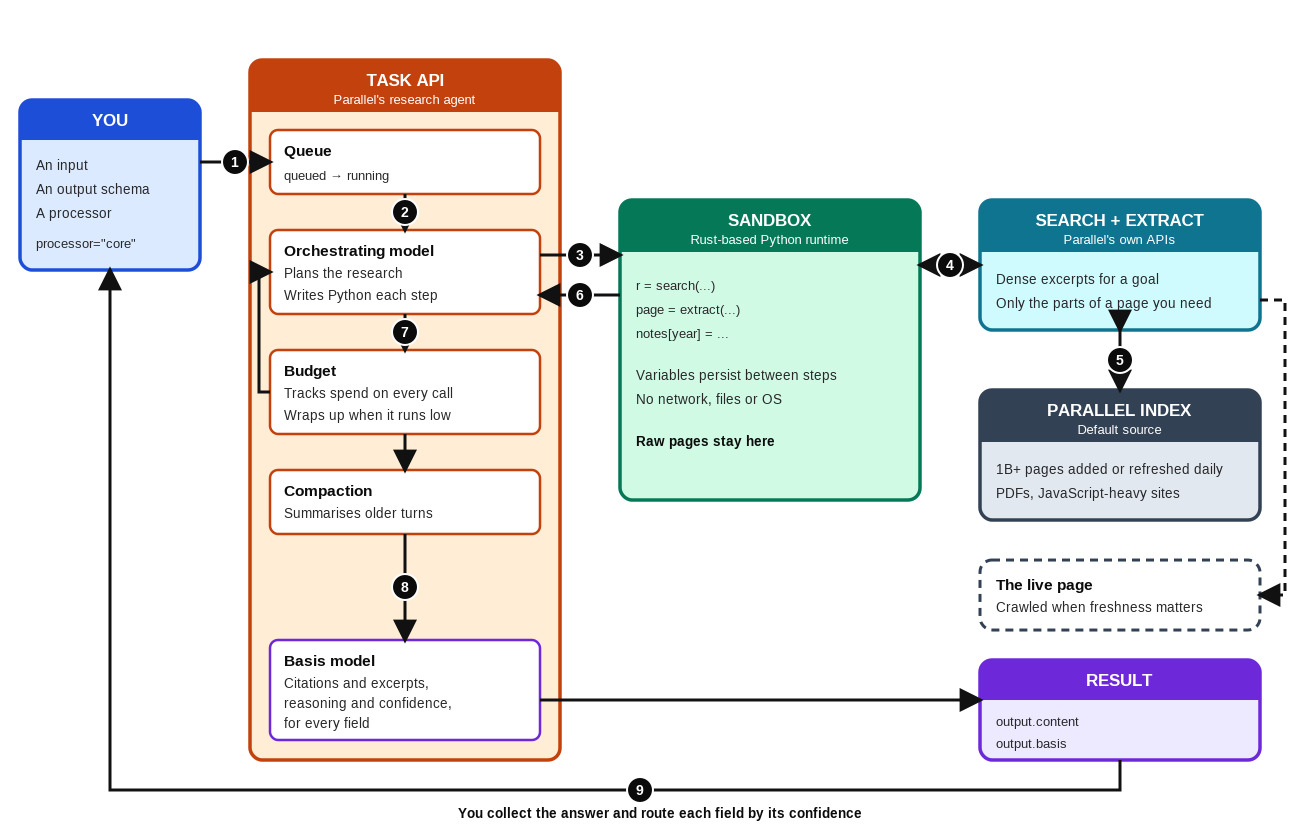
- You send a brief: an input, an output schema and a processor
- The run is queued, and you get a run ID back straight away
- The orchestrating model plans and writes Python
- The code runs in the sandbox, calling
searchandextractas functions - Search and Extract read Parallel’s index, or crawl the live page when freshness matters
- Raw pages stay in the sandbox. Only the results the code returns go back to the model
- Repeat until the budget runs low, compacting the conversation when it gets long
- The agent writes the answer into your schema, and Basis attaches citations, excerpts, reasoning and a confidence to each field
- You collect the result and route each field by its confidence
How it compares to Exa and Keenable
| Exa | Keenable SELECT | Parallel Task API | |
|---|---|---|---|
| Returns | Ranked pages | A table | Your schema, filled in, with evidence |
| You write | A query | Your agent writes SQL | A brief and an output shape |
| Where the work is | Before the query: indexing | During the query: a model per row | During the query: an agent loop |
| Speed | Under 200 ms | Seconds to minutes | 10 seconds to two hours |
| Best at | Finding the right page | Questions spread across many pages | Deep questions about one thing |
| Published internals | A lot about the index | The query engine | The agent harness and verification |
Parallel also sells an Exa-shaped product in its Search API. But its research API is a different kind of thing: you’re not buying search results, you’re buying a finished piece of research and the evidence for it.
What I’d take from this
- Declare the output, not the steps. A schema gives you consistent results across thousands of runs, and it gives every fact a place to attach evidence.
- Keep raw data out of the prompt. Letting the model write code that calls tools, and only return what it needs, is the single biggest idea here. It works in your own agents too.
- Budget by spend, not by step count. Easy questions finish early, hard ones get room to work, and the bill is still predictable.
- Ask for evidence per field, then review by confidence. If the labels are calibrated, checking only the low-confidence rows gets you most of the accuracy of checking everything.
- Check the curve before paying for more. On DeepSearchQA, going from
ultra4xtoultra8xdoubled the price for 1 point. Test a few processors on your own questions. - Pick the cheapest layer that does the job. If a person is waiting, use Search on
fastorturbo. Save the Task API for work that can run in the background.
The thing that surprised me most is that Parallel’s big idea isn’t about search at all. It’s about memory. A research agent mostly fails by drowning in its own notes, and the fix is to give the model somewhere other than its context to keep them.
Sources
- Introducing the Parallel Task API, Parallel, April 2025
- Introducing Basis with Calibrated Confidences, Parallel, May 2025
- Introducing Parallel Search, Parallel, November 2025
- Introducing Parallel FindAll, Parallel, November 2025
- Introducing Parallel Extract, Parallel, November 2025
- Latency improvements on the Parallel Task API, Parallel, December 2025
- Introducing Granular Basis for the Task API, Parallel, December 2025
- Stateful web research agents with multi-turn conversations, Parallel, March 2026
- A new deep research frontier on DeepSearchQA with the Task API Harness, Parallel, April 2026
- Upgrades to the Parallel Search & Extract APIs, Parallel, April 2026
- Introducing Index by Parallel, Parallel, May 2026
- Introducing Fast mode for Parallel Search, Parallel, August 2026
- How to evaluate web search for AI, Parallel, August 2026
- Are all System One models created equal?, Parallel, October 2026
- Processors, Research Basis, Search Modes and Pricing, Parallel docs